
Enterprise Multi-Tenant Security Architecture: Managing Risk, Visibility, and Vulnerability at Scale
Introduction
Enterprise IT environments are becoming increasingly distributed across multiple Microsoft tenants due to mergers and acquisitions, regional operating models, subsidiaries, managed service provider engagement, and regulatory separation. While multi-tenant architecture provides business flexibility, it also creates architectural complexity across identity, security operations, vulnerability management, compliance, and data visibility.
For enterprise leaders, the challenge is no longer only about enabling collaboration. The real challenge is building a secure, governed, and scalable operating model where Microsoft Defender XDR, Microsoft Sentinel, Microsoft Entra ID, Azure, Microsoft 365, and Power Platform work together without creating fragmented security controls.
Key Technical Challenges in Multi-Tenant Enterprises
Multi-tenant Microsoft environments introduce several practical challenges:
- Cross-tenant visibility: Security teams need centralized visibility across incidents, devices, exposure scores, vulnerabilities, identities, and audit activity.
- Sentinel and Defender XDR boundaries: Microsoft Sentinel connectors are often tenant-bound, which makes native ingestion of Defender XDR incidents from another tenant difficult without additional architecture.
- GDAP and RBAC complexity: Delegated administration requires careful mapping of Entra roles, Defender roles, Azure RBAC, Privileged Identity Management, and Conditional Access policies.
- Vulnerability management at scale: SOC and endpoint teams need a consistent way to prioritize exposed devices, unmanaged assets, missing patches, risky software, and configuration weaknesses.
- Compliance and data residency: Some enterprises separate IT, OT, regional, or regulated workloads into different tenants, which complicates monitoring and reporting.
- User experience: Cross-tenant collaboration must remain seamless across Teams, SharePoint, OneDrive, Exchange, and enterprise applications.
Without a clear architecture, organizations often end up with duplicate Sentinel workspaces, inconsistent Defender configurations, manual tenant switching, fragmented hunting queries, and delayed incident response.
Microsoft Architecture Approach
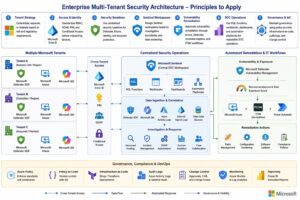
A mature Microsoft enterprise architecture should combine the following capabilities:
Microsoft Entra ID should act as the identity control plane. Cross-tenant access settings, B2B collaboration, Conditional Access, MFA trust, PIM, and least-privilege role assignments should be standardized across tenants.
Microsoft Defender XDR should be used as the unified detection and response layer across endpoint, identity, email, SaaS, and cloud app signals. In multi-tenant scenarios, Defender Multi-Tenant Organization capabilities help central SOC teams review incidents, device inventory, exposure levels, user entities, and hunting data across multiple tenants.
Microsoft Sentinel should be positioned as the SIEM/SOAR layer. For complex multi-tenant environments, enterprises should decide whether to use separate Sentinel workspaces per tenant, Azure Lighthouse-based operations, or custom API/Logic App ingestion where native connectors cannot cross tenant boundaries.
Microsoft Defender Vulnerability Management should be integrated into endpoint operations. Exposure score, device risk, software inventory, missing security updates, and remediation recommendations should feed into ITSM, Intune, or automation workflows.
Azure and Power Platform provide automation and integration. Logic Apps, Azure Functions, Power Automate, Microsoft Graph, KQL, and Azure Resource Graph can help orchestrate response, reporting, and governance across tenants.
Architecture Best Practices
Enterprise architects should apply these principles:
- Define a clear tenant strategy: consolidate, separate, or federate based on risk and regulatory requirements.
- Standardize RBAC, GDAP, PIM, and Conditional Access before onboarding tenants.
- Use centralized security baselines for Defender, Intune, identity, and endpoint protection.
- Design Sentinel workspaces based on investigation boundaries and data ownership.
- Automate vulnerability remediation through Intune, Defender recommendations, and ITSM workflows.
- Use KQL functions, workbooks, dashboards, and automation playbooks for repeatable SOC operations.
- Maintain governance using policy-as-code, infrastructure-as-code, audit logs, and change control.
Business Outcomes
A well-designed Microsoft multi-tenant security architecture delivers measurable value:
- Faster detection and response across distributed environments
- Better vulnerability prioritization using risk and exposure data
- Reduced manual effort through automation and standardized governance
- Improved compliance visibility across regions and business units
- Lower operational cost by avoiding duplicated security processes
- Stronger resilience during M&A, divestitures, and business expansion
Conclusion
Enterprise multi-tenant management is now a core security architecture discipline. Organizations that treat identity, Defender XDR, Sentinel, vulnerability management, automation, and governance as one integrated operating model will be better prepared to manage risk at scale. The next generation of enterprise security will not be defined by how many tools an organization owns, but by how effectively those tools are integrated, governed, and operationalized across every tenant, device, identity, and workload.

