
Readers hope you are doing good, getting solution as expected. today i will be updating how to read and troubleshoot upgrade logs.
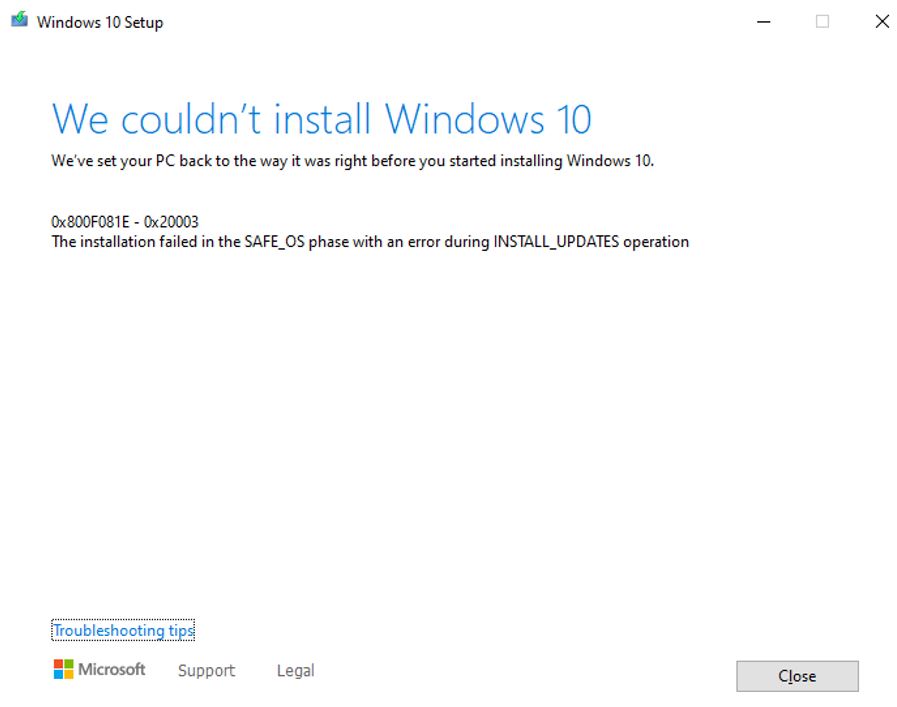
One of widnows 10 Upgrade issue: While upgrade windows 10, upgrade is failing with error code. 0x800F081E – Ox20003

Let me explain how these error code will work and how to resolve these kind error
Extend codes can be matched to the phase and operation when an error occurred. To match an extend code to the phase and operation:
- Use the first digit to identify the phase (ex: 0x4000D = 4). In our scenarios 0x20003 = 2
- Use the last two digits to identify the operation (ex: 0x4000D = 0D). 0x20003 = 3
- Match the phase and operation to values in the tables provided below.
The following tables provide the corresponding phase and operation for values of an extend code:
For example:
In our scenarios of 0x20003, represents a problem during phase 2 (0x2) with SP_EXECUTION_SAFE_OS AND SP_EXECUTION_OP_DOWNLOAD_UPDATES (0003).
An extend code of 0x4000D, represents a problem during phase 4 (0x4) with data migration (000D).
Below are the overview of the table
Extend code: phase
|
Hex |
Phase |
|
0 |
SP_EXECUTION_UNKNOWN |
|
1 |
SP_EXECUTION_DOWNLEVEL |
|
2 |
SP_EXECUTION_SAFE_OS |
|
3 |
SP_EXECUTION_FIRST_BOOT |
|
4 |
SP_EXECUTION_OOBE_BOOT |
|
5 |
SP_EXECUTION_UNINSTALL |
Extend code: Operation
|
Hex |
Operation |
|
0 |
SP_EXECUTION_OP_UNKNOWN |
|
1 |
SP_EXECUTION_OP_COPY_PAYLOAD |
|
2 |
SP_EXECUTION_OP_DOWNLOAD_UPDATES |
|
3 |
SP_EXECUTION_OP_INSTALL_UPDATES |
|
4 |
SP_EXECUTION_OP_INSTALL_RECOVERY_ENVIRONMENT |
|
5 |
SP_EXECUTION_OP_INSTALL_RECOVERY_IMAGE |
|
6 |
SP_EXECUTION_OP_REPLICATE_OC |
|
7 |
SP_EXECUTION_OP_INSTALL_DRIVERS |
|
8 |
SP_EXECUTION_OP_PREPARE_SAFE_OS |
|
9 |
SP_EXECUTION_OP_PREPARE_ROLLBACK |
|
A |
SP_EXECUTION_OP_PREPARE_FIRST_BOOT |
|
B |
SP_EXECUTION_OP_PREPARE_OOBE_BOOT |
|
C |
SP_EXECUTION_OP_APPLY_IMAGE |
|
D |
SP_EXECUTION_OP_MIGRATE_DATA |
|
E |
SP_EXECUTION_OP_SET_PRODUCT_KEY |
|
F |
SP_EXECUTION_OP_ADD_UNATTEND |
|
Hex |
Operation |
|
10 |
SP_EXECUTION_OP_ADD_DRIVER |
|
11 |
SP_EXECUTION_OP_ENABLE_FEATURE |
|
12 |
SP_EXECUTION_OP_DISABLE_FEATURE |
|
13 |
SP_EXECUTION_OP_REGISTER_ASYNC_PROCESS |
|
14 |
SP_EXECUTION_OP_REGISTER_SYNC_PROCESS |
|
15 |
SP_EXECUTION_OP_CREATE_FILE |
|
16 |
SP_EXECUTION_OP_CREATE_REGISTRY |
|
17 |
SP_EXECUTION_OP_BOOT |
|
18 |
SP_EXECUTION_OP_SYSPREP |
|
19 |
SP_EXECUTION_OP_OOBE |
|
1A |
SP_EXECUTION_OP_BEGIN_FIRST_BOOT |
|
1B |
SP_EXECUTION_OP_END_FIRST_BOOT |
|
1C |
SP_EXECUTION_OP_BEGIN_OOBE_BOOT |
|
1D |
SP_EXECUTION_OP_END_OOBE_BOOT |
|
1E |
SP_EXECUTION_OP_PRE_OOBE |
|
1F |
SP_EXECUTION_OP_POST_OOBE |
|
20 |
SP_EXECUTION_OP_ADD_PROVISIONING_PACKAGE |
Now we know what problem is let me show you how to resolve.
Error code with:
When you look logs in setupact.log you will see below error code in logs

In our scenarios of 0x20003, represents a problem during phase 2 (0x2) with SP_EXECUTION_SAFE_OS AND SP_EXECUTION_OP_DOWNLOAD_UPDATES (0003).
To resolve launch setup.exe
Step 1: Open download location — > Click on setup — >

Step 2:

Once we run upgrade for this option it will go as normal
Conclusion these error comes when they try to download upgrade and try to install upgrade language pack these error comes.
Happy Learning!!!
Thanks & regards,
Haresh Hirani
Email: [email protected], [email protected]
Facebook https://www.facebook.com/Hiraniconfigmgr-120189361980772/
Follow us: https://www.linkedin.com/in/hiraniconfigmgr
Twitter: https://twitter.com/hiraniconfigmgr

