Thursday, June 4, 2026

POLICY_Provider 620 microsoft SQL reported SQL message 547 severity 16
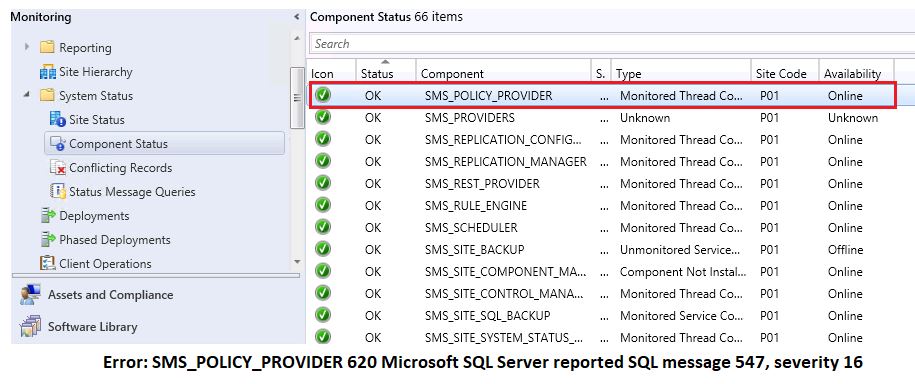

Today I will be discussed about issue that your deployment was working as expected till yesterday but when next day you have enter to the office for major change implementation while schedule deployment none of the client is getting deployment. 
Quite interesting if you are installing already deployed available application its working fine but new deployment is not working. Let’s have details solution. 
Issue: None of the deployment is working, Client is not getting policy.
Pre-validation.
Point 1: We have validated existing deployment it working fine. So that we have created new sample package just to validate that weather client is getting new package policy or not but found that client is not getting policy and deployment is not getting available on the client systems.
By seeing this problem there is problem with server side which is not allowing to move further.
Point 2: We have look all server components found all the major location policy component SMS_POLICY_PROVIDER is not showing green as expected. 
Point 3: To view issue in details look status message of the error report components. Found below error
Severity Type Site code Date / Time System Component Message ID Description
Error Milestone SPS 13/02/2020 8:12:56 PM SCCMMP.XYZ.COM SMS_POLICY_PROVIDER 620 Microsoft SQL Server reported SQL message 547, severity 16: [23000][547][Microsoft][SQL Server Native Client 11.0][SQL Server]The INSERT statement conflicted with the FOREIGN KEY constraint “ResPolicyMap_PolicyAssignment_FK”. The conflict occurred in database “CM_P01”, table “dbo.PolicyAssignment”, column ‘PADBID    Please refer to your Configuration Manager documentation, SQL Server documentation, or the Microsoft Knowledge Base for further troubleshooting information.
Point 4: By seeing above error found that sccm client is not able to download policy
SCCM Client can’t download the policy from the MP’s.
Now we have error, Let’s convert to the solutions. 
Below are the action taken to convert in to the solution
Step 1: Login to the SQL SERVER connect management studio of the error reported database (CM_P01) 
Step 2: Execute below query to validate what exact problem is
Select * from SoftwarePolicy where PADBID not in (select PADBID from PolicyAssignment)
We have received result as two package ID: One was task sequence and one was driver package
By taking that package id we have recreate task sequence and delete reported package from console and re execute above query then we got 0 result it means our problem got resolve. All the reported error from above component start processing and deployment went success.
Happy to share many solutions. Keep watching space @hiraniconfigmgr.com if you want to received email please subscribe in home page.  Many are already why are you waiting for new solutions. 
Happy Learning!!!

Thanks & Regards
Solution Teams
Email: [email protected], [email protected]
Facebook https://www.facebook.com/Hiraniconfigmgr-120189361980772/
Follow me: https://www.linkedin.com/in/hiraniconfigmgr

Author

  • Hi, I’m Haresh Hirani the mind behind Hiraniconfigmgr.com. I’m a seasoned IT professional with deep expertise in Microsoft technologies, especially in Configuration Manager (ConfigMgr/SCCM). Over the years, I’ve expanded my skill set to cover a broader range of modern device management platforms like Microsoft Intune, Jamf Pro, ManageEngine Endpoint Central, and VMware AirWatch (Workspace ONE UEM), I use this blog to document real-world, tested, working fixes and walkthroughs from my daily technical experiences. The 💡idea is simple: if it helped me, it might help someone like you. My goal is to create a living repository of practical IT solutions for the community. If you find something useful, or if you want to collaborate, feel free to connect with me on LinkedIn or drop a message through the Contact page. Happy to help.

LEAVE A REPLY

Please enter your comment!
Please enter your name here

Latest posts
