
Thursday, June 4, 2026

Unable to Connect 1610 Console
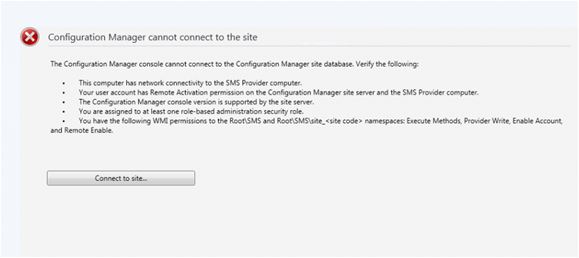
Error Reported:

1610 SCCM Console is not getting open giving wmi error

Unable to Connect 1610 Console System.Management.ManagementException\r\nProvider load failure\r\n

Solution:

Step 1: validate SmsAdminUI.log Logs.

Step 2: By seeing found console is not getting require connection.

Step 3: Validate sql DB error logs and found requester has detached and attached database. so Below error reported in logs.

An error occurred in the Microsoft .NET Framework while trying to load assembly id 65539. The server may be running out of resources, or the assembly may not be trusted with PERMISSION_SET = EXTERNAL_ACCESS or UNSAFE. Run the query again, or check documentation to see how to solve the assembly trust issues. For more information about this error:

Step 4: Validate events and found many events are trier with An error occurred in the Microsoft .NET Framework while trying to load assembly id 65539. Below are the screen shot for reference.

By seeing all above error below are the solutions found

Step 5: Manually reset the property to ON by running the following command against your CM database

ALTER DATABASE SET TRUSTWORTHY ON

After follow steps console start working as normal if still issue validate below define points in note.

Note:

Point 1: Make sure that the database that was moved is owned by the SA account.

Point 2: Make sure that the Isolation Level value is set to READ_COMMITTED_SNAPSHOT. To check this value, run the following command: DBCC USEROPTIONS

Point 3: If the Isolation Level value is set to anything other than READ COMMITTED SNAPSHOT, run following commands in the given order:

ALTER DATABASE SET ALLOW_SNAPSHOT_ISOLATION ON

ALTER DATABASE SET READ_COMMITTED_SNAPSHOT ON

For Details Click Here with different issue but same solution work for wmi issue.

Happy Learning:-)

Thanks&regards,
Haresh Hirani
Email: [email protected], [email protected]
Facebook https://www.facebook.com/Hiraniconfigmgr-120189361980772/
Follow us: https://www.linkedin.com/in/hiraniconfigmgr 
Twitter: https://twitter.com/hiraniconfigmgr\

Author

  • Hi, I’m Haresh Hirani the mind behind Hiraniconfigmgr.com. I’m a seasoned IT professional with deep expertise in Microsoft technologies, especially in Configuration Manager (ConfigMgr/SCCM). Over the years, I’ve expanded my skill set to cover a broader range of modern device management platforms like Microsoft Intune, Jamf Pro, ManageEngine Endpoint Central, and VMware AirWatch (Workspace ONE UEM), I use this blog to document real-world, tested, working fixes and walkthroughs from my daily technical experiences. The 💡idea is simple: if it helped me, it might help someone like you. My goal is to create a living repository of practical IT solutions for the community. If you find something useful, or if you want to collaborate, feel free to connect with me on LinkedIn or drop a message through the Contact page. Happy to help.

1 COMMENT

LEAVE A REPLY

Please enter your comment!
Please enter your name here

Latest posts
