1. OVERVIEW
Scalefusion Veltar is an endpoint security solution designed to protect managed devices and organizational data. It provides security capabilities through the Scalefusion console, helping IT administrators manage application access, external device usage, web traffic, and secure network connectivity.
By bringing these controls together, Veltar helps organizations strengthen endpoint protection and maintain consistent security policies across supported devices.
2. INTRODUCTION TO VELTAR
Veltar extends the Scalefusion ecosystem with security-focused features that help organizations manage and protect their endpoints.
Its main capabilities include:
– Controlling application access and execution.
– Restricting unauthorized external device usage.
– Filtering web traffic and restricting access to unwanted websites.
– Providing secure connectivity to internal corporate resources.
– Integrating with third-party security solutions.
These capabilities help IT administrators manage endpoint security from a centralized platform.
3. PLATFORM OVERVIEW
The Scalefusion dashboard provides a centralized interface for accessing and managing Veltar’s security modules.
The major offerings include:
– Essential Integrations
– Compliance
– Application Control
– I/O Device Access Control
– Secure Web Gateway
– Virtual Private Network (VPN)
Administrators can configure applicable security policies and deploy them to managed devices through the Scalefusion console.
4. KEY FUNCTIONALITIES AND CAPABILITIES
4.1 ESSENTIAL INTEGRATIONS
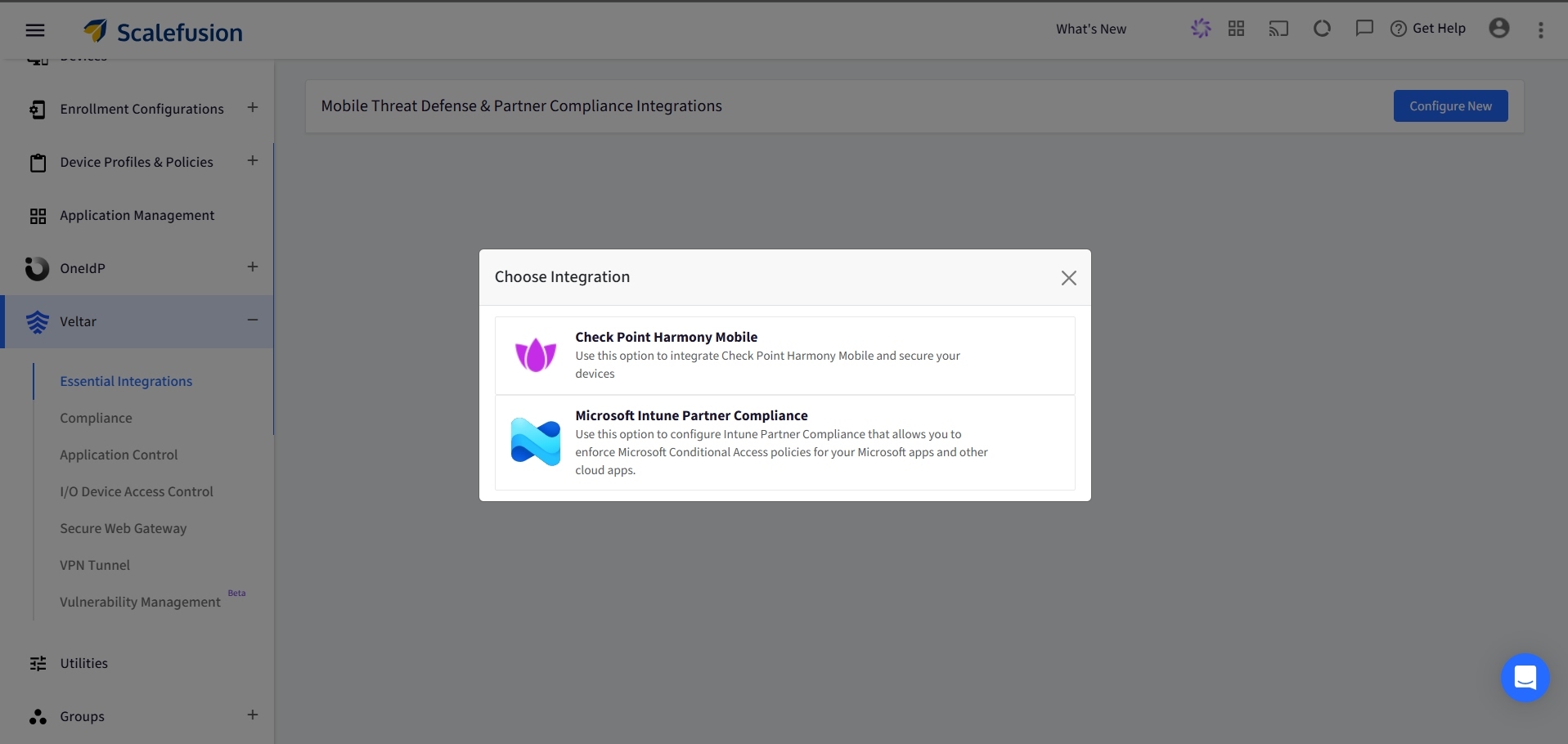
Veltar supports integrations with third-party security solutions to extend endpoint protection and improve security management.
The key integrations include:
– Check Point Harmony Mobile: Integrates Check Point’s Mobile Threat Defense (MTD) capabilities with Scalefusion to strengthen mobile device security.
– Microsoft Intune Partner Compliance: Allows Scalefusion to share device compliance information with Microsoft Intune. This information can be used with Microsoft Entra Conditional Access policies to make access decisions based on device compliance.
These integrations help organizations connect endpoint management with their existing security and compliance environments.
4.2 COMPLIANCE
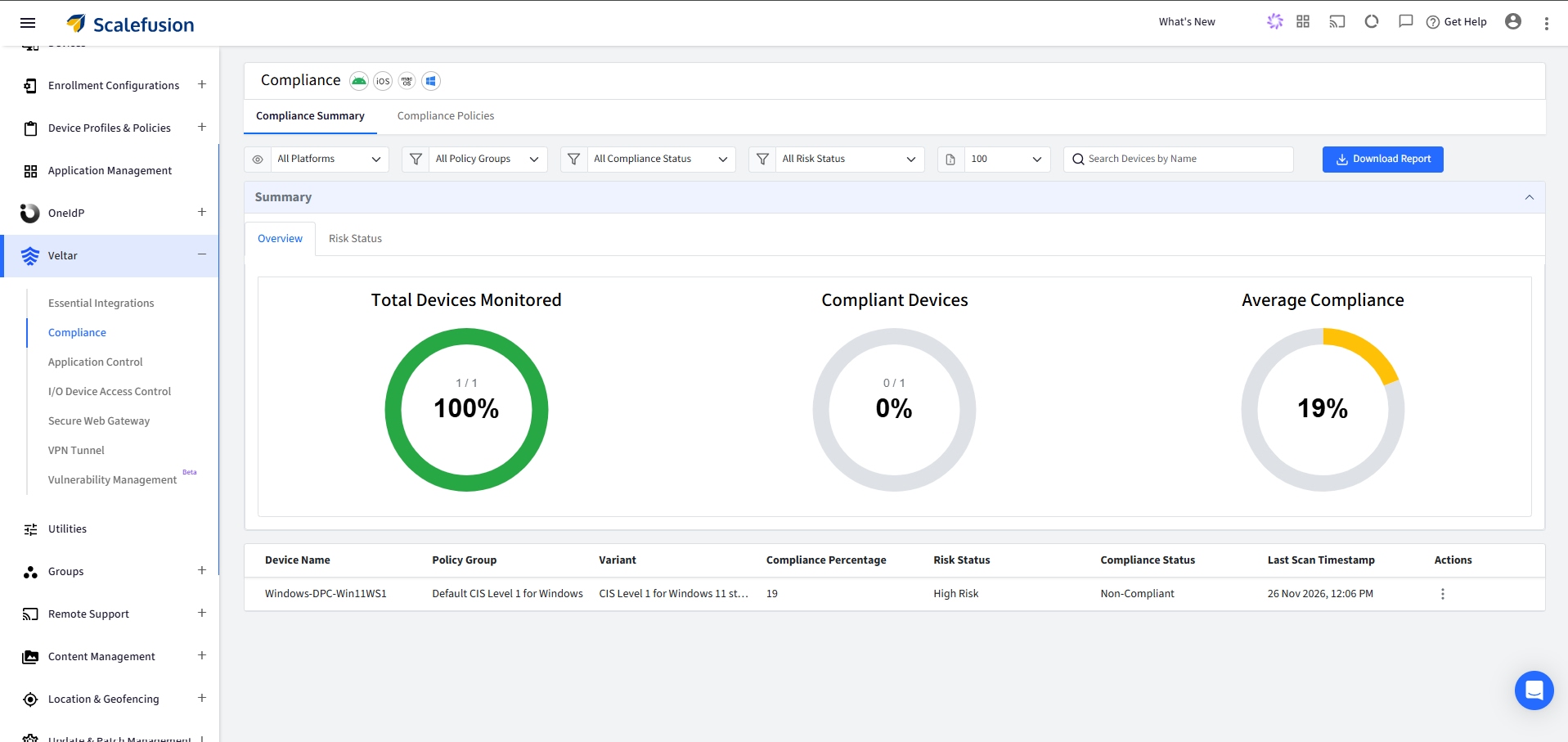
Scalefusion Veltar’s Compliance Management capability helps organizations maintain security standards across managed Windows devices. It enables IT administrators to monitor device configurations, identify security gaps, and enforce compliance policies based on established security benchmarks such as CIS Level 1.
By automating compliance monitoring and remediation, Veltar helps reduce manual administrative effort while strengthening endpoint security.
Key Capabilities
– Policy Groups and Security Benchmarks
– Compliance Monitoring
– Automated Remediation
– Centralized Compliance Dashboard
– Risk Assessment and Reporting
Devices are categorized into different risk levels based on their security scores, helping IT teams prioritize devices that require attention.
4.3 APPLICATION CONTROL
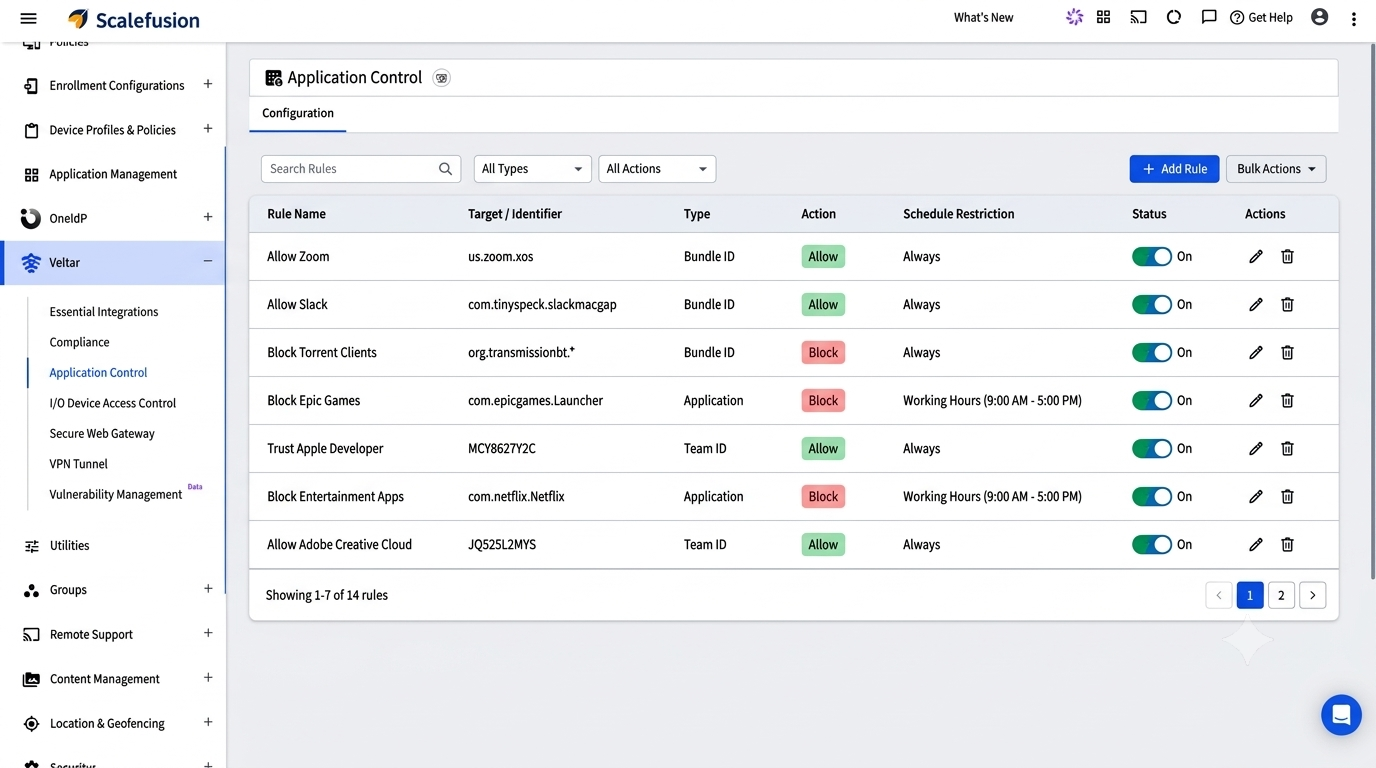
Application Control allows IT administrators to manage which applications can run on managed macOS devices.
It uses Apple’s Endpoint Security framework to enforce application execution policies.
Key capabilities:
– Application Allowlisting and Blocklisting: Allow approved applications or block selected applications.
– Application Identification: Create rules using Team ID, Bundle ID, Signing Certificate, or Application File Hash.
– Conditional Blocking: Apply restrictions based on configured days, times, and device IP addresses.
– Blocking Notifications: Configure silent blocking or display a message when an application is blocked.
– User and Device Restrictions: Apply application rules to specific users or devices.
– Detailed Logging: Review information about blocked application activities.
This feature helps organizations reduce risks associated with unauthorized software and maintain better control over application execution.
4.4 I/O DEVICE ACCESS CONTROL
I/O Device Access Control helps organizations manage access to external USB devices and reduce the risk of unauthorized data transfers.
Administrators can define global access policies and individual device-level restrictions.
Key capabilities:
– Global Access Mode: Configure USB access as Read/Write, Read Only, or Block.
– Per-Device Rules: Identify devices using Vendor ID, Product ID, or Serial Number.
– Granular Access Control: Assign different access permissions to individual devices.
– Encryption Enforcement: Require supported storage devices to be encrypted before access.
– iOS/iPadOS Integration: Configure policies for iPhones and iPads connected to macOS devices.
These controls help protect organizational information by managing how external devices interact with managed endpoints.
4.5 SECURE WEB GATEWAY
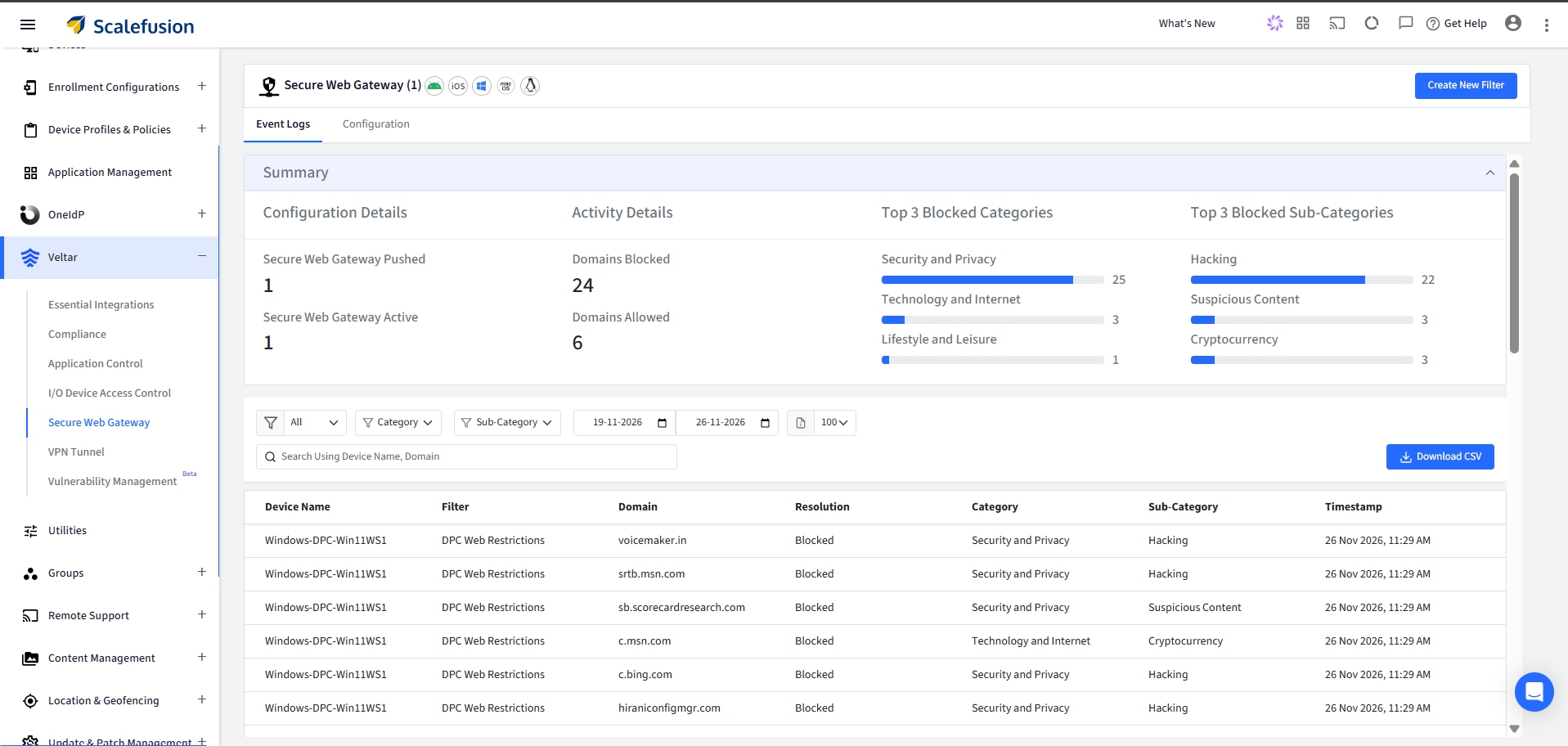
Secure Web Gateway (SWG) helps organizations control internet access by filtering web traffic and restricting access to unwanted websites.
Administrators can create web filtering policies based on organizational requirements.
Key capabilities:
– Category-Based Filtering: Block websites belonging to categories such as social media, gaming, and adult content.
– Custom Blocklists: Add specific websites or domains that should be restricted.
– Allowlist Overrides: Permit approved websites even when applicable blocklist rules would otherwise restrict them.
– Centralized Web Filtering: Manage browsing restrictions through the Scalefusion dashboard.
Veltar’s Secure Web Gateway documentation covers managed Android, Windows, iOS, macOS, and Linux devices.
These capabilities help organizations establish safer browsing environments and control access to online resources.
4.6 VELTAR VPN
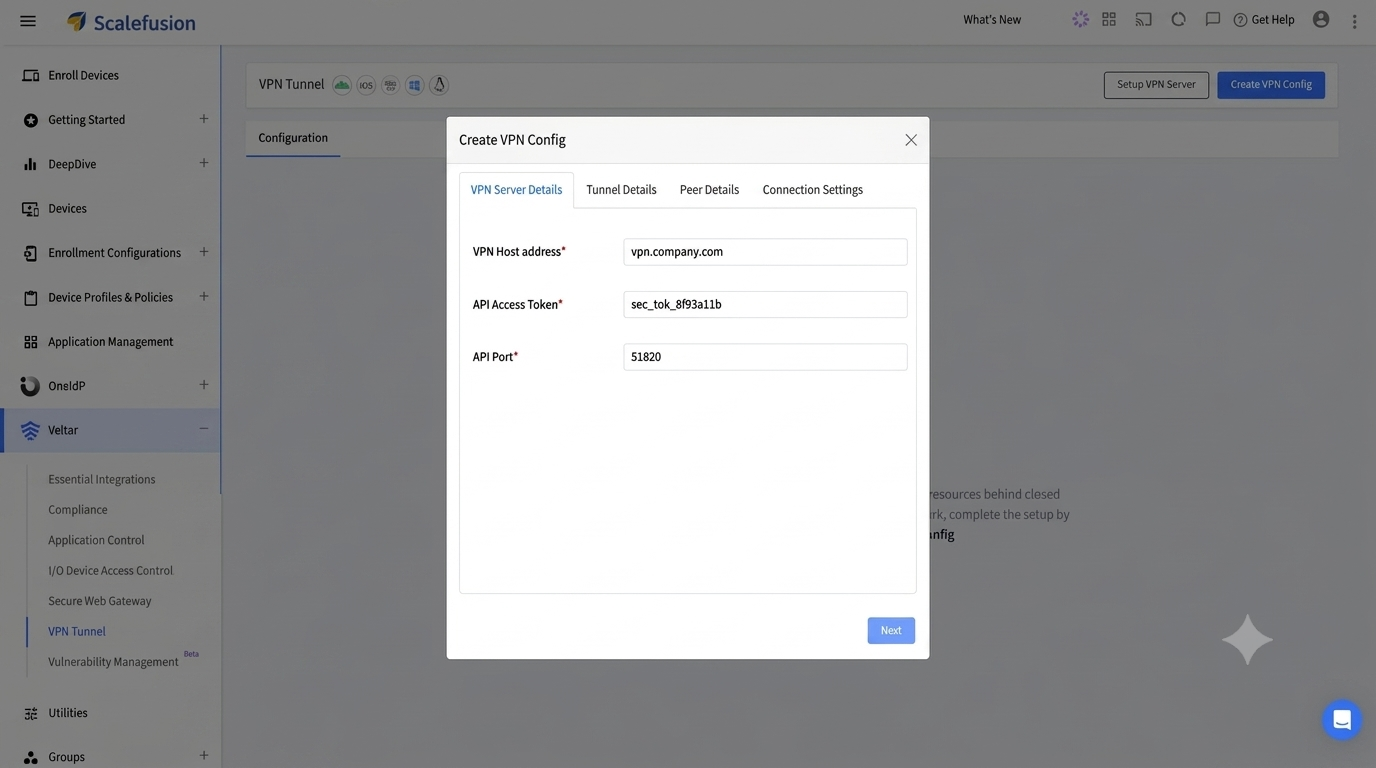
Veltar VPN provides secure connectivity between managed devices and organizational network resources located behind a firewall.
It is powered by WireGuard, which provides the underlying VPN technology.
Key capabilities:
– On-Premises Deployment: Install the Veltar VPN server software on organizational infrastructure.
– Centralized Management: Configure VPN tunnels through the Scalefusion console.
– Automated Deployment: Manage tunnel creation, user configuration, and deployment.
– Selective Traffic Routing: Route selected traffic through the VPN tunnel while allowing other traffic to use the normal internet connection.
– Secure Access: Restrict access to internal network resources to managed devices.
This functionality helps organizations provide secure access to internal resources while maintaining control over network connectivity.
5. PRACTICAL PLATFORM WALKTHROUGH
The Veltar platform walkthrough provides an introduction to the Scalefusion dashboard and its security management interface.
The main areas covered in the platform overview are:
– Dashboard Navigation: Understanding the centralized management interface.
– Essential Integrations: Reviewing available third-party security integration options.
– Application Control: Exploring application allowlist and blocklist configurations.
– I/O Device Access Control: Understanding external device access policies.
– Secure Web Gateway: Reviewing website filtering and access restrictions.
– VPN Configuration: Exploring the VPN server setup and configuration interface.
The walkthrough serves as an introduction to the platform’s interface and available security modules. Reviewing a configuration screen does not necessarily mean that a policy was deployed or successfully tested on a managed device.
6. BEST PRACTICES
The following recommendations help maintain effective endpoint security:
– Apply the principle of least privilege when configuring application and device access.
– Test security policies on a limited group of devices before wider deployment.
– Restrict unnecessary external storage access.
– Enforce encryption requirements for supported storage devices.
– Maintain allowlists for business-critical websites.
– Review relevant security logs and events regularly.
– Verify operating system compatibility before deploying policies.
– Review VPN infrastructure and connectivity requirements before implementation.
7. CONCLUSION
Scalefusion Veltar brings multiple endpoint security capabilities together through a centralized management platform. Its features help organizations control application execution, restrict external device access, filter web traffic, and establish secure connections to internal corporate resources.
By combining these capabilities with third-party security integrations, Veltar helps organizations strengthen endpoint protection and manage security policies more efficiently.
Understanding its modules and configuration options provides a useful foundation for learning endpoint security management through the Scalefusion platform.
8. REFERENCE DOCUMENTATION
1. Official Scalefusion Veltar Documentation:
https://help.scalefusion.com/docs/introduction-2
2. Secure Web Gateway Documentation:
https://help.scalefusion.com/docs/secure-web-gateway
3. Veltar VPN Documentation:
https://help.scalefusion.com/docs/vpn-tunnel