
As organizations continue adopting Android Enterprise and Microsoft Intune for modern device management, IT teams are encountering new challenges related to enrollment, authentication, shared device management, and user experience.
Based on recent discussions from the Android Enterprise and Intune communities, here are some of the most important issues, updates, and recommendations every endpoint management professional should be aware of.
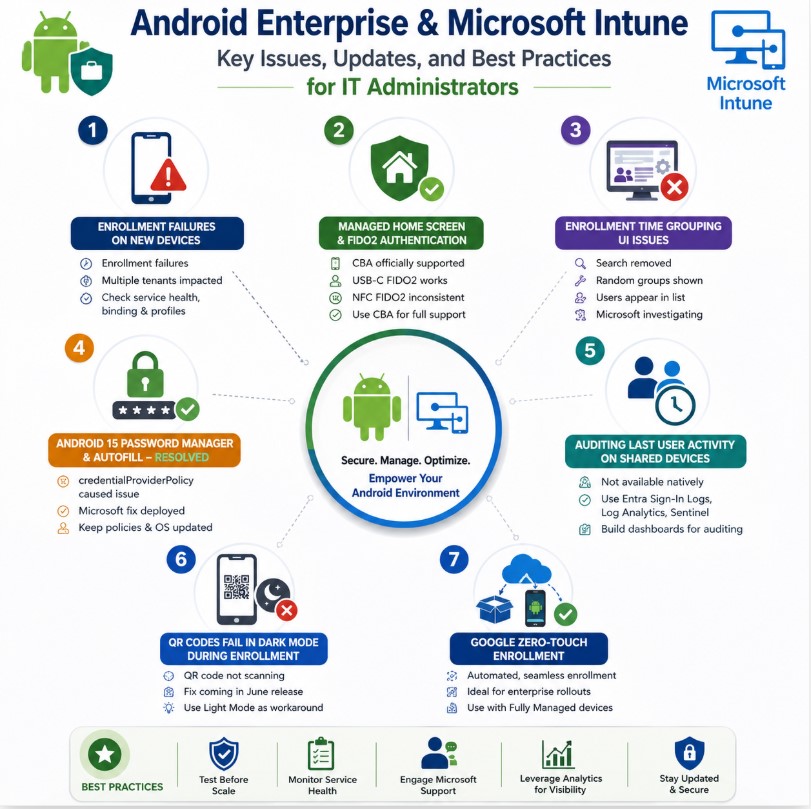
1. Android Enterprise Enrollment Failures on New Devices
Several administrators have reported enrollment issues with newly released Android devices, particularly the Samsung Galaxy A36. Devices fail to complete Android Enterprise enrollment despite no visible errors appearing within Microsoft Intune Tenant Health.
Common Symptoms
• Android Work Profile enrollment failures
• Multiple tenants affected
• No corresponding alerts in Intune Service Health
• Consistent issues across different enrollment methods
What This Means
Current findings suggest that the issue is not related to individual tenant configuration but may be linked to compatibility between Android Enterprise, device firmware, and Intune enrollment services.
Recommended Actions
• Verify Android Enterprise binding status
• Review Microsoft Intune Service Health
• Test alternative enrollment profiles
• Validate device firmware versions
• Open a Microsoft support case if the issue impacts multiple devices
Key Takeaway
Organizations deploying newly released Android models should conduct pilot testing before large-scale rollouts to identify potential enrollment compatibility issues early.
________________________________________
2. Managed Home Screen and FIDO2 Authentication
Passwordless authentication continues to gain traction, but questions remain regarding official support for FIDO2 authentication within Managed Home Screen environments.
Microsoft documentation officially supports Certificate-Based Authentication (CBA), while support cases have indicated that FIDO2 authentication is not currently documented as a supported method.
Community Testing Results
Authentication Method Status
| Certificate-Based Authentication (CBA) | Officially Supported |
| USB-C FIDO2 Security Keys | Working Successfully |
| Passkeys | Generally Functional |
| NFC FIDO2 Authentication | Inconsistent Results |
What Organizations Should Know
Many administrators have successfully authenticated using USB-C FIDO2 security keys and Passkeys. However, because Microsoft has not formally documented support for these scenarios within Managed Home Screen, organizations should carefully evaluate risk and supportability requirements.
Recommendation
For environments requiring strict vendor-supported configurations, Certificate-Based Authentication remains the safest choice. Organizations pursuing passwordless initiatives may continue evaluating FIDO2 and Passkeys through pilot programs before wider deployment.
________________________________________
3. Enrollment Time Grouping User Interface Issues
Recent changes to the Android enrollment experience within Intune introduced several usability concerns.
Reported Problems
• Search functionality removed from group selection
• Random Entra ID groups displayed
• Users appearing alongside groups during assignment
These changes have created challenges for administrators managing large environments with extensive group structures.
Microsoft Response
Microsoft has acknowledged the issue and confirmed that the user experience requires improvement.
Recommendation
At present, no workaround fully restores the previous experience. Organizations should monitor future Intune updates for UI enhancements and continue providing feedback through Microsoft support channels.
________________________________________
4. Android 15 Password Manager and Autofill Issue Resolved
A significant issue affecting Android 15 devices enrolled through Intune prevented third-party password managers from being selected as Autofill providers.
Root Cause
The problem was linked to the Android Enterprise policy: credentialProviderPolicy
which caused credential providers to remain disabled under certain enrollment scenarios.
Resolution
Microsoft has now implemented a fix, and administrators are reporting successful functionality following recent updates.
Recommendation
Ensure devices receive the latest Intune policies and verify Android system updates are applied. Organizations relying on password managers should validate Autofill functionality during Android 15 upgrade testing.
________________________________________
5. Auditing Last User Activity on Shared Android Devices
One of the most frequently requested features for Android Enterprise Shared Devices is the ability to identify the last user who signed into a device.
Unfortunately, Microsoft currently does not provide this information directly within Intune.
Why This Is Challenging
Both Microsoft Intune and Microsoft Entra ID are primarily user-centric platforms rather than device-session-centric solutions.
As a result, administrators cannot simply open a device record and view the last authenticated user.
Recommended Workaround Organizations can leverage:
• Microsoft Entra Sign-In Logs
• Azure Log Analytics
• Microsoft Sentinel
to correlate Managed Home Screen sign-in events with device information.
This approach allows security teams to build custom dashboards and audit reports showing recent device usage activity.
Best Practice
Forward authentication logs into Log Analytics and create automated reporting dashboards for operational and security auditing.
________________________________________
6. Why Google Zero-Touch Enrollment Matters
Many organizations still rely on traditional Android enrollment methods that require user interaction during setup.
Google Zero-Touch Enrollment offers a significantly more streamlined experience.
Traditional Enrollment Process Users must:
• Scan a QR code
• Sign in manually
• Complete enrollment steps
• Configure device setup
Zero-Touch Enrollment Process Devices automatically:
• Receive configuration profiles
• Download required management components
• Enroll into Android Enterprise
• Apply corporate policies
during the initial device setup experience. Ideal Use Cases
• Enterprise device rollouts
• Corporate-owned Android devices
• Fully Managed deployments
• Dedicated Kiosk devices
• Large-scale provisioning projects
Recommendation
Organizations deploying Android Enterprise at scale should strongly consider combining Google Zero-Touch Enrollment with Microsoft Intune Fully Managed devices to reduce deployment effort, improve user experience, and accelerate provisioning.
Final Thoughts
Android Enterprise and Microsoft Intune continue to evolve rapidly
Focused on Excellence. Committed to Success. Driven by Growth.

